

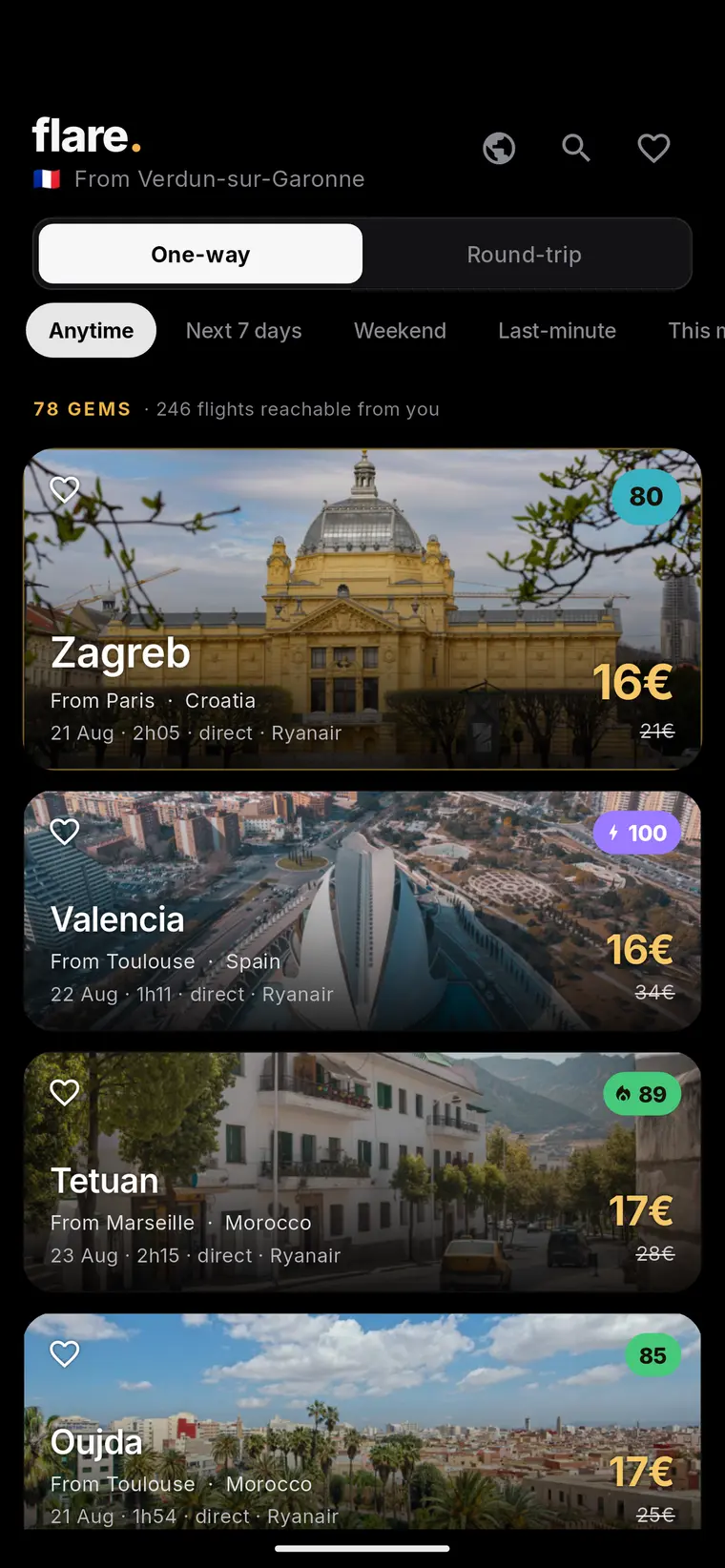

Why a flight price drop alert only works if you set it up correctly
A price drop alert is only as useful as the search it's attached to. If the origin, destination, dates, and cabin class are too rigid, the alert can miss genuinely good fares that appear on nearby dates or from a nearby airport. If they're too loose, you'll get noise instead of signal. The goal is to define a search specific enough to be relevant to your actual trip, but flexible enough to catch the price movement that matters.
Before setting anything up, it helps to decide what 'a good deal' means for your trip. Is it a fixed budget you won't go above? A percentage below what you've seen quoted elsewhere? A specific date window you can't move? Answering this first turns the alert from a passive notification into a decision tool you can act on quickly when it fires.
Setting up an alert in Google Travel
Google Travel lets you track flights and prices directly from a search results page or an individual flight listing, and will notify you when the price for that specific itinerary changes. This is documented in Google's own support pages and is one of the more accessible ways to monitor a route without checking manually every day.
To get useful results, search with the dates and route you're actually considering, then track the specific flight or fare class you'd book, not just the cheapest option shown that day. If your travel dates are flexible, it's worth setting up more than one search across a plausible date range, since a single tracked itinerary won't reflect movement on nearby dates.
Alerts like this are a monitoring tool, not a guarantee. They tell you when a tracked price changes, but they don't verify seat availability at that price, and they can't account for fare rules, baggage costs, or fees added at checkout. Treat a notification as a prompt to go check the booking page, not as confirmation that the deal is locked in.
How Flare fits into a flight price drop alert routine
Flare is a service that surfaces flight-deal discovery pages organized around a traveller's departure city, rather than a single route you have to define and track yourself. Its public pages describe a methodology where the fares it surfaces are identified as being at least 30% below the reference price it uses for that route, which is a different approach from setting a per-route alert: instead of watching one itinerary, you're looking at a curated list of routes already flagged as unusually cheap relative to their own baseline.
For a reader building a price drop alert routine, this makes Flare more useful as a discovery layer than a replacement for tracking a specific trip. If you already know exactly where and when you want to fly, a route-specific alert like Google Travel's tracking feature is the more direct tool. If you're open to where you go and just want to know when something is meaningfully cheaper than usual, a discovery page organized by departure city fits that flexible-comparison use case better.
Either way, the fare and availability shown at the moment of discovery is not final. Flare's own pages note that displayed fares and availability can change and need to be confirmed with the booking provider, which is the same caveat that applies to any tracked price: what you saw when the alert fired is a starting point for verification, not a locked-in price.
A worked example: combining a route alert with a flexible discovery check
Example (illustrative only, not a real fare): Say you live in Chicago and want to visit somewhere in Europe sometime in the next four months, with a loose budget of $600 round trip. You could set a Google Travel alert for a single route, say Chicago to Lisbon, across a two-week window you're targeting. That covers the 'I have a destination in mind' case.
At the same time, because your destination is genuinely flexible, you check a departure-city discovery page for Chicago periodically to see which European routes are currently flagged as significantly below their usual reference price. If Lisbon doesn't move but Porto or Copenhagen does, the discovery page surfaces that option even though you never set up a dedicated alert for it.
When either signal fires, the next step is the same: open the booking provider's page directly, confirm the live fare and the exact dates, check what's included (bags, seat selection, changes), and only then decide. Neither the route alert nor the discovery page removes this verification step; they simply tell you when it's worth doing.
A short checklist before you act on any price drop notification
Whether the alert comes from a route tracker or a discovery page, the same short list of checks applies before you commit to booking. This isn't about second-guessing every notification, it's about making sure the number you saw is the number you'll actually pay.
- Confirm the fare on the airline or booking provider's own page, not just the alert or listing screen
- Check that the dates, cabin, and number of passengers match what triggered the alert
- Look at total cost including baggage, seat selection, and any add-on fees before comparing to your budget
- Note the fare rules for changes and cancellations, especially on a flexible or unbooked trip
- Verify current entry, passport, visa, and health requirements for your destination before finalizing travel
Keeping total-trip cost in view, not just the flight
A flight price drop, even a large one, is only part of the trip's real cost. A fare that's 30% below the usual reference price can still make for a more expensive trip overall if accommodation, local transport, or seasonal pricing at the destination offset the saving. Before booking on the strength of an alert, it's worth doing a quick sanity check on the destination's costs for your travel window, not just the flight itself.
This is particularly relevant for flexible travellers using a discovery-style approach, since the routes surfaced are chosen for the flight price movement, not for how affordable the destination is overall. A short mental total-trip estimate, flight plus a rough nightly accommodation cost plus known local expenses, keeps the alert useful without letting an attractive flight price alone drive a booking decision.
Requirements that alerts and fares never cover
No price alert, route tracker, or discovery page accounts for entry, passport, visa, or health requirements, because these depend on your nationality, your destination, and sometimes your itinerary's transit points, not on the fare itself. This is true whether the trip was found through a manual search, a Google Travel alert, or a departure-city discovery page.
Before finalizing any booking triggered by a price drop, it's worth a direct check with official government or embassy sources for the destination and any transit countries, since requirements can change and are specific to your passport and travel dates. Treat this as a separate step from the price check, not something the alert or the booking provider will flag for you.
Live destination map
Fare data meets travel intelligence
Move from a current fare signal to a photographed destination page, then use Flare guides to evaluate the complete trip.



Frequently asked questions
Do I need a specific tool to set a flight price drop alert, or can I do it manually?
You can track fares manually by checking a route repeatedly, but a tool like Google Travel's price tracking feature will notify you automatically when a specific tracked itinerary's price changes, which saves the need for manual daily checks.
If an alert says the price dropped, is that price guaranteed when I book?
No. Displayed fares and seat availability can change between when an alert fires and when you complete a booking, so it's always worth confirming the live price and availability directly on the booking provider's page before paying.
How is a departure-city deal discovery page different from a route-specific price alert?
A route-specific alert, like Google Travel's tracking feature, monitors one itinerary you define and notifies you of changes to it. A departure-city discovery page, such as the ones Flare publishes, instead surfaces multiple routes from your city that are already flagged as notably below their usual reference price, which suits travellers who are flexible about destination rather than fixed on one route.
Sources and further reading
These resources provide the wider reference frame. Product statements on this page are limited to the public information provided by Flare.